One conversation. Multiple systems.
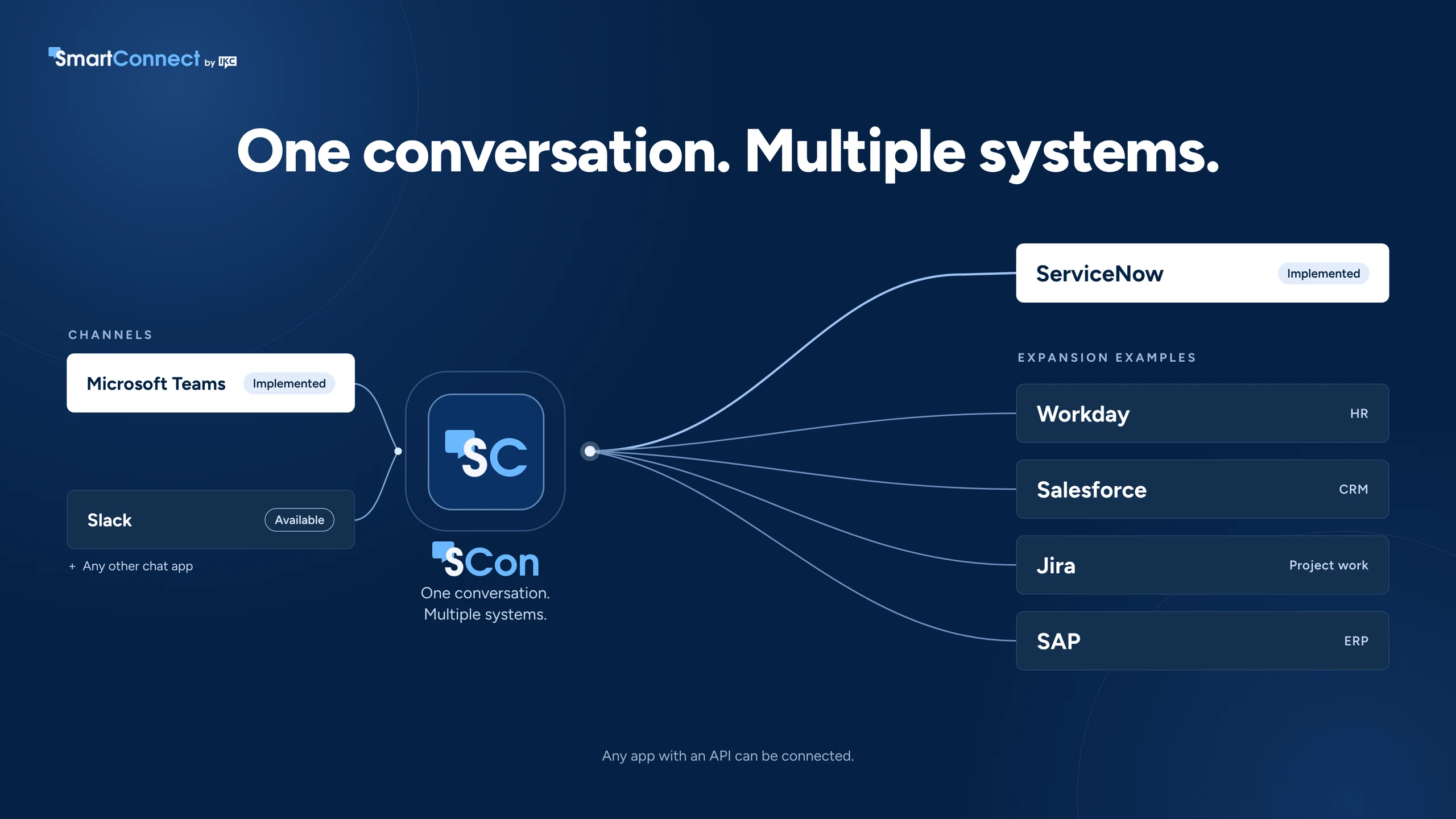
(SCon) is an AI assistant in the chat app your people already use. Employees ask in plain language, and SCon gets it done across ServiceNow and your other systems.
Microsoft Teams
Slack
Any chat app
Built by IKC. Used at IKC every day.

For organisations whose data and work are spread across many applications.
Each request type has its own system, form and sign-in.
The same details are typed again for each system.
Work moves between teams by email and re-keying.
Progress sits in several places, so people chase updates.
An AI assistant that brings requests to where people already work, and does the work across your systems.
No forms, portals or separate logins. Employees just say what they need, in the chat app they already use.
SCon makes sure key details are not missed and confirms before submitting.
Approvals, updates and outcomes come back to the same conversation.
One Conversation. Every Role.
Employees
Approvers
Fulfillers
How a request flows
One record. One connected workflow.
Example shown in Microsoft Teams. works in any chat app. Click any screen to enlarge.
Microsoft Teams
Slack
Any chat app
ServiceNow stays your system of record. SCon raises records there, so your workflows, approvals and reporting stay in place.
Secure by design: people use their existing sign-in, every action runs under their own permissions, and data is encrypted in transit.
Examples only. Any system with an API, configured to your rules.
Example: Software access request with manager approval
Example: Leave approved in chat and added to the calendar
SharePointExample: New starters get the right policies on day one
CalendarExample: Welcome meeting booked for a new starter
SalesforceExample: Customer escalation logged on the case
JiraExample: Escalation handed to engineering in one message

Example: Requisition routed to the budget holder
Your own appsExample: The same chat experience for in-house tools
Illustrative examples. Every process is configured to each organisation's own systems and rules, and permissions always follow the user's own access.
Most business applications now come with their own AI assistant. Each one works inside its own application, with its own data. works across them, from one conversation in the chat app your people already use.
| Application-specific AIThe assistant built into each application | ||
|---|---|---|
| What it covers | One application and its own data | Every connected system, from one conversation |
| Where people use it | Inside each application's own portal or assistant, so people switch between them | In the chat app they already use: Teams, Slack or another |
| Best when | The task starts and ends in one application | The task spans several applications |
| Where work is recorded | In that one application | In each system involved, with ServiceNow as the system of record |
| Typical example | Reset a password in one system, or check a leave balance in another | Set up a new starter across ServiceNow, Workday, SharePoint and the calendar, in one conversation |
Many organisations span their process across platforms. raises records in your selected platforms, so your existing workflows, approvals and reporting stay in place.
See live. We map one process that spans your systems and scope what SCon needs.
One package gets you live, including the licence, implementation and support: one chat channel connected to ServiceNow.
Connect Workday, SAP, calendars or your own apps as you grow.
Solutions define outcomes. Platforms enable execution.
A. Microsoft Teams and Slack, and other chat channels can be connected too. The video shows Microsoft Teams as an example.
A. The AI built into each application works inside that application. works across your applications from one conversation, so a request that touches several systems is handled from start to finish without switching tools. Many organisations use both.
A. No. ServiceNow stays your system of record. raises records there, so your workflows, approvals and reporting stay in place. It brings the conversation to where people work and connects ServiceNow to your other systems.
A. Any system with an API, such as Workday, Salesforce, Jira, SAP, SharePoint, calendars and your own in-house apps. Each process is configured to your systems and rules.
A. Yes. People use their existing sign-in, every action runs under their own permissions, and data is encrypted in transit. connects your systems rather than storing your business data.
A. Yes. We built it for ourselves first, and we use it at IKC every day.
A. Start with a demo or discovery workshop. We map one process that spans your systems, then a single start-up package gets you live with one chat channel connected to ServiceNow. More systems can be added as you grow.